[Csnd] Csound 7 Vanilla build installer for MacOS

Hi everyone,

from today we have started providing an installer for MacOS for Csound 7 as a github action CI artefact.
With this we are now making binaries available for both MacOS and Windows, which will reflect the latest
code in the develop branch.

The installer is available from the github actions page on the repository

Just click on the latest built from the develop branch, and scroll to the bottom of the page, where
you find the artefacts for Windows and MacOS.

Details

- This is a vanilla build: it contains the necessary to run Csound on the Mac, but nothing with extra dependencies
(no OSC opcodes, no portaudio, jack, or portmidi modules). Audio and midi IO can use MacOS services directly
(auhal, coremidi). Libsndfile is also vanilla - no flac, ogg-vorbis, or mp3 support. Since Csound now supports OSC
in its UDP server, we have very little loss of functionality in this version.

- It is a universal build for arm64 and x86_64.

- The build is fully self-contained: no external dependencies (except for the system libraries).

- The installer works similarly to the release installers as it requires extra authorisation to run.

- The installation is fully independent from Csound 6.x and it can live alongside it.

- Files are placed only in /Applications/Csound. The installer carries the framework and the csound CLI frontend.

You can run it from the terminal using the command

/Applications/Csound/csound

It should work with VS Code as a frontend using the Csound plugin for it and adding the relevant paths.

Frontend developers can use this package to develop new versions of their programs for Csound 7. Rory has
already successfully built Cabbage 3 using it and should have something working at some level functionality soon.

I have tested the examples C and C++ programs in the csoundAPIexamples repository and pushed sample CMake
scripts to show how to link to this installation on MacOS. I think we just need now to find a good way of integrating
ctcsound.py into this installer, but I’ll work with François on that.

I think this probably paves the way for us using the CI tools to build full installers for Csound when we reach the
release of 7.0

Enjoy!
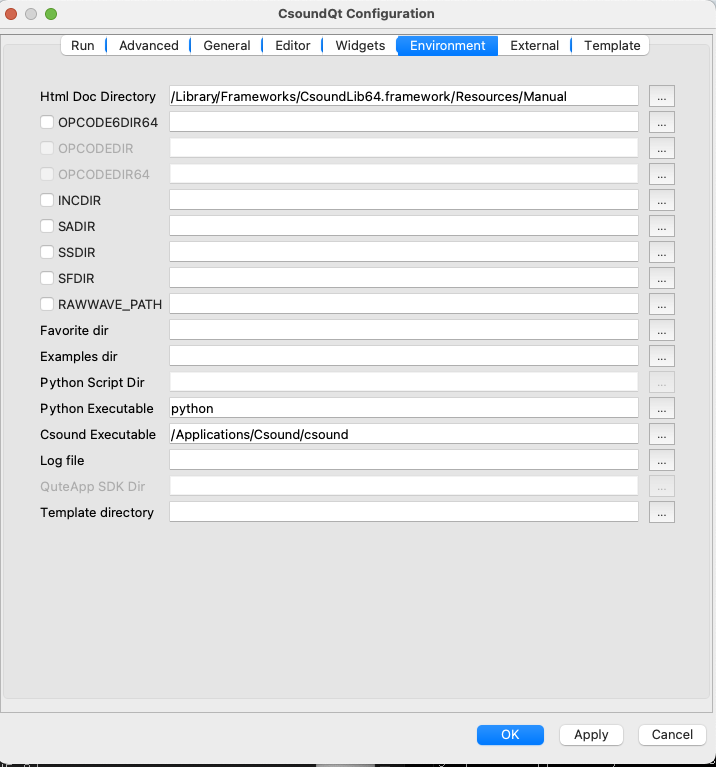
NICE!

Working - even with CsoundQt from the ‘terminal’ and when selecting MacBook Pro Speakers as the output!

  • so happy to be testing this with my current work and examples.

Hope that you add portaudio and some of the other bits soon.

The vanilla build installer won’t have portaudio etc., it is not meant to replace the release installer. Once we release, then we will have a full installer as for 6.x.

In fact, coreaudio directly gives better performance so there is no need for portaudio.
The coreaudio module is the default currently in CsoundQt as far as I know (Tarmo can confirm).

Prof. Victor Lazzarini
Maynooth University
Ireland

Hi!

This is great news!
I will try to build a CsoundQt version for Csound 7 on Mac (and Windows) soon.

greetings,
tarmo

Kontakt Victor Lazzarini (<000010b17ddd988e-dmarc-request@listserv.heanet.ie>) kirjutas kuupäeval K, 9. oktoober 2024 kell 23:31:

Hi everyone,

from today we have started providing an installer for MacOS for Csound 7 as a github action CI artefact.
With this we are now making binaries available for both MacOS and Windows, which will reflect the latest
code in the develop branch.

The installer is available from the github actions page on the repository

https://github.com/csound/csound/actions/workflows/csound_builds.yml

Just click on the latest built from the develop branch, and scroll to the bottom of the page, where
you find the artefacts for Windows and MacOS.

Details

  • This is a vanilla build: it contains the necessary to run Csound on the Mac, but nothing with extra dependencies
    (no OSC opcodes, no portaudio, jack, or portmidi modules). Audio and midi IO can use MacOS services directly
    (auhal, coremidi). Libsndfile is also vanilla - no flac, ogg-vorbis, or mp3 support. Since Csound now supports OSC
    in its UDP server, we have very little loss of functionality in this version.

  • It is a universal build for arm64 and x86_64.

  • The build is fully self-contained: no external dependencies (except for the system libraries).

  • The installer works similarly to the release installers as it requires extra authorisation to run.

  • The installation is fully independent from Csound 6.x and it can live alongside it.

  • Files are placed only in /Applications/Csound. The installer carries the framework and the csound CLI frontend.

You can run it from the terminal using the command

/Applications/Csound/csound

It should work with VS Code as a frontend using the Csound plugin for it and adding the relevant paths.

Frontend developers can use this package to develop new versions of their programs for Csound 7. Rory has
already successfully built Cabbage 3 using it and should have something working at some level functionality soon.

I have tested the examples C and C++ programs in the csoundAPIexamples repository and pushed sample CMake
scripts to show how to link to this installation on MacOS. I think we just need now to find a good way of integrating
ctcsound.py into this installer, but I’ll work with François on that.

I think this probably paves the way for us using the CI tools to build full installers for Csound when we reach the
release of 7.0

Enjoy!

Prof. Victor Lazzarini
Maynooth University
Ireland

Csound mailing list
Csound@listserv.heanet.ie
https://listserv.heanet.ie/cgi-bin/wa?A0=CSOUND
Send bugs reports to
https://github.com/csound/csound/issues
Discussions of bugs and features can be posted here

Csound mailing list Csound@listserv.heanet.ie https://listserv.heanet.ie/cgi-bin/wa?A0=CSOUND Send bugs reports to https://github.com/csound/csound/issues Discussions of bugs and features can be posted here

Good news! Many thanks.

Mike

Thanks for this info (and for all this amazing and important work) Victor!

Great to know that CoreAudio is better than PortAudio on the MacBook Pro.- I was under the impression it was the opposite.

Happy to be able to so conveniently use/explore these Vanilla Builds!